If you work around construction, facility maintenance, or event setup, 16M boom lifts are the workhorses that get crews high and tight—at just the right height to reach signage, repair ceiling HVAC, or install stage rigging without the hassle of scaffolding. But when one throws an error code mid-job, it can shut down a shift, delay a project, and leave your team scrambling. For years, as a supplier of 16M boom lifts, I’ve fielded hundreds of calls from operators and maintenance techs stuck staring at a blinking code, unsure where to start. I’ve seen too many people jump for a full part replacement before checking a 50-cent loose wire, or call a tech out for a reset that would have fixed it in 30 seconds. Troubleshooting these codes isn’t rocket science—it’s systematic, and it starts with slowing down. Let’s break it down step by step, using the most common error codes our 16M models throw, and the fixes that actually work. 16M Boom Lift
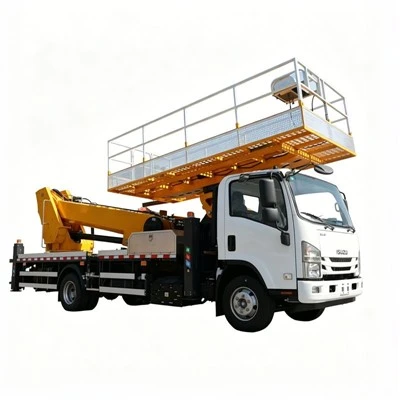
First, the most important rule: never ignore a safety-related code. Our 16M boom lifts, like all mobile access equipment, are built with interlocks that won’t let the unit operate if a fault crosses a safety line. If your display shows a code with “E” at the start (E001, E002, etc.) versus an “F” for fault or a “C” for communication, safety is priority one. Let’s start with the codes that pop up most often on our 16M units, and walk through troubleshooting each.
Take E005, the “Proximity Interlock Failure” code, which is the number one complaint we get from operators. This code triggers when one of the lift’s safety proximity sensors isn’t registering a closed or open circuit as it should, cutting power to the boom’s extension or chassis drive. 9 out of 10 times, this isn’t a bad sensor—it’s a simple loose connection or dirty sensor. Here’s how to fix it: first, locate the sensor. On our 16M boom lifts, the main proximity sensors for interlocks are mounted on the turret base (where the boom connects to the chassis), the platform’s entry gate, and the hydraulic valve bank that controls lift movement. Turn off the unit’s main power switch—this is non-negotiable; working with live power on a boom is a risk. Next, inspect the wiring harness leading to each sensor. Look for frayed insulation, corrosion on the pin connectors, or a wire that’s slipped out of the terminal block. On our 16M models, many of these harnesses run along the boom’s hydraulic lines, so vibration from regular use can loosen connectors over time. If the wiring looks intact, clean the sensor face with a dry microfiber cloth—dust, concrete splatter, or rainwater can build up and block the sensor’s signal. For the gate sensor, a common spot for grime, lift the gate, check the small metal tab that triggers the sensor, and make sure it’s not bent out of alignment. If none of that works, test the sensor with a multimeter set to continuity mode: disconnect the sensor’s plug, touch one meter lead to each pin. If the reading jumps to zero, the sensor is working; if it stays high, it’s faulty. We keep replacement sensors in stock for all our 16M models, but again, this code almost never requires a new part.
Next up is F012, a hydraulic pressure fault code that’s the second most common error on our 16M boom lifts. This code means the hydraulic system isn’t building enough or too much pressure to operate the boom, and it’s often mistaken for a major pump failure. Here’s the truth: hydraulic systems are finicky, and 70% of F012 codes we see trace back to hydraulic fluid or filters, not the pump. Start with the basics: park the lift on a flat, level surface—we can’t stress this enough. If the lift is tilted even a few degrees, the fluid level reading will be off, causing pressure sensors to misfire. Locate the hydraulic fluid reservoir on the chassis (it’s a black, labeled tank on all our 16M models) and check the level with the dipstick. If it’s below the “full” mark, top it off with the hydraulic fluid specified in your unit’s manual—using the wrong weight fluid is another common cause. Our 16M units require ISO 32 hydraulic fluid, and using a heavier fluid in cold weather can cause pressure sensors to flag a fault. Next, check the hydraulic filter. On our 16M boom lifts, the filter is located near the pump, and it’s designed to be changed every 500 hours of use. If you haven’t changed it in over a year, it’s likely clogged with metal shavings or dirt, restricting flow and triggering the pressure code. Finally, test the pressure sensor itself: the sensor is mounted on the main hydraulic manifold, and if it’s covered in grime or has a frayed wire, it will give a false reading. Clean the sensor’s port with electrical contact cleaner, and check the wiring for damage. If that still doesn’t resolve it, a pressure gauge test is easy to do—we recommend a 5000 PSI gauge, and you can rent one from any equipment supply shop for 20 dollars. If the actual pressure is within the unit’s specs, the sensor is bad; if it’s low, you’ll likely need a new hydraulic filter or a pump tune-up.
One code that confuses a lot of new operators is C008, a communication error between the boom’s control module and the display panel. This code usually pops up randomly, after a bumpy job site drive, or when the unit has been sitting in cold or hot storage for a month. The fix here is almost always a communication reset, but not just turning the key off and on. For our 16M boom lifts, the correct reset for C008 is a full power cycle: turn the key to the “off” position, flip the main power disconnect switch (usually located under the chassis, near the battery), wait 5 full minutes—this gives the control modules time to discharge and reset—then flip the disconnect back on, turn the key to “on” without starting the engine, and wait 10 seconds for the display to boot up. 8 out of 10 times, this clears the code. If it comes back within a day, check the CAN bus cables that run between the control modules. These are the thick, multi-pin cables that connect the chassis module to the boom module, and they’re often routed close to hydraulic lines, so chafing or loose connectors are common. Inspect the cables for cuts or exposed wires, and make sure all connectors are fully seated. If the cables look intact, the issue is likely a faulty module, which we can replace quickly, but again, this code rarely needs anything major.
We also get a lot of questions about S002, the battery voltage low code, which triggers when the unit’s battery is too discharged to power the controls or the engine. Many operators mistake this for a bad battery, but it’s almost always a charging issue. First, check the battery terminals: loose corrosion or a corroded connector is the most common cause. Disconnect the battery cables (negative first, then positive), clean the terminals with a wire brush and baking soda solution, then reconnect them tight, making sure the positive cable goes to the positive post and negative to negative. Next, test the battery’s state of charge: use a 12-volt battery tester to check the voltage. If it’s below 12.4 volts, charge it with a 2-amp trickle charger overnight—fast charging can damage the battery and trigger false low voltage codes. If the battery won’t hold a charge after charging, it’s time for a replacement, and we stock genuine 12-volt lithium-ion and lead-acid batteries for all our 16M boom models at wholesale rates.
Now, let’s talk about when to call a professional, and when you can handle it yourself. I’ve seen a lot of techs charge a service call for a reset that would have taken 5 minutes, but I’ve also seen operators make a small fault worse because they skipped a safety step. If you’ve gone through the steps for the code and it’s still popping up, stop work and check for safety hazards: is the boom overloaded? Our 16M models have a 500-pound capacity, and overloading triggers safety codes that can’t be reset until weight is reduced. Is the boom in a fully retracted position when the code appears? If it’s extended mid-fault, retract it fully before resetting, as most safety codes require the unit to be in neutral retracted state to clear. If you’ve done all the basic checks: power cycle, check wiring, fluid levels, filters, and the code is still present, that’s when it’s time to reach out for support.
As a supplier of 16M boom lifts, we don’t just sell units—we provide troubleshooting guides, replacement parts, and support for every model we supply. We keep a full inventory of sensors, filters, batteries, and control modules for all our 16M models, so any part you need can ship the same day. We also offer on-site service for clients who need it, and our team of certified techs can walk you through troubleshooting over the phone if you’re stuck on a job site, no extra charge.

If you’re currently using a 16M boom lift and struggling with recurring error codes, or you’re in the market for a reliable unit that’s easy to maintain, don’t hesitate to reach out. We work with construction companies, facility maintenance teams, and event planners of all sizes, and we can help you find the right model for your needs, as well as ongoing support to keep your equipment running smoothly.
16M Boom Lift References
- Access Industry Engineers Association. (2022). Troubleshooting Mobile Elevating Work Platforms (MEWPs): Standard Practices for Error Code Resolution.
- JLG Industries. (2021). 16M Boom Lift Maintenance and Fault Code Guide.
- OSHA. (2020). Safe Operation and Troubleshooting of Boom Lifts for Construction Applications.
- Skyjack Inc. (2022). Hydraulic System Diagnostics for 15-18 Meter Boom Lifts.
Voyantek Intelligent Equipment Co., Ltd.
As one of the most professional 16m boom lift manufacturers and suppliers in China, we’re featured by quality products and good service. Please rest assured to wholesale advanced 16m boom lift from our factory. We also accept customized orders.
Address: zhongde Plaza, Jining, Shandong, China
E-mail: james@voyantek.com
WebSite: https://www.voyantek.com/
